

| Main Page > Browse Categories > How To / Articles > Bandwidth and Processor Load Control in ViceVersa |
Bandwidth and Processor Load Control in ViceVersa
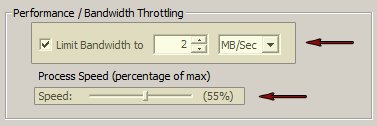
In ViceVersa PRO you can easily control the Bandwidth used and the Processor Load to prevent overloading your system while copying files.
The Bandwidth that ViceVersa PRO uses while copying files can be set as a MB/Sec or KB/Sec max value.
The Processor Load can be set as a percentage of the max CPU speed available.
By using these settings you can setup ViceVersa PRO to work transparently without any impact on the resources of your system.
Attachments
No attachments
Did this help you?
Yes No
Statistics
63% found this information useful
Other Options
Printable Version
General Information
No. 81
Author: TGRMN Software
Download ViceVersa
Visit ViceVersa Forum
No attachments
Did this help you?
Yes No
Statistics
63% found this information useful
Other Options
Printable Version
General Information
No. 81
Author: TGRMN Software
Download ViceVersa
Visit ViceVersa Forum
A printable version of the entire ViceVersa FAQ and Knowledge Base is also available.
For further queries, please contact us by E-Mail at support@tgrmn.com.
User Comments
Does bandwidth affect the speed of my computer's communication with my network, including Internet and Web activities?
Can you please give more detail in the help files and in this FAQ about how users can understand better whether to use one, both or neither of these controls?
Thank you.
The 'bandwidth' option controls how much of the available bandwidth (over a disk or network) ViceVersa will use.