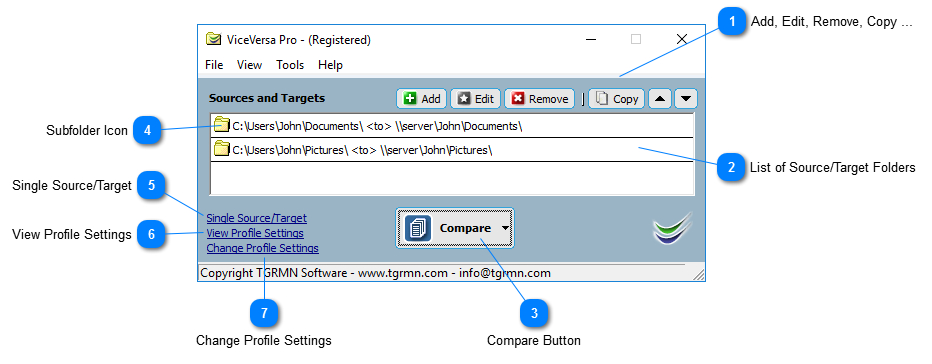
The Main Window - Multiple Sources/Targets View
Add, Edit, Remove, Copy ...
Adds, edits, removes, copies, moves up the list, moves down the list a source / target pair. The order is significant: folders are scanned from the top to the bottom of the list.
Top
List of Source/Target Folders
List of source/target folders. Multiple pairs can be specified.
Top
Compare Button
Compares source and target and shows the comparison window.
From the drop down button, 'Compare and Execute' can be selected to compare source and target, show the comparison window AND execute the profile.
Top
Subfolder Icon
The subfolder icon shows if subfolders are included or not for a source/target pair.
Top
Single Source/Target
Switches to single source/target view.
Top
View Profile Settings
Shows View Profile Settings window.
Top
Change Profile Settings
Opens Profile Settings window.
Top