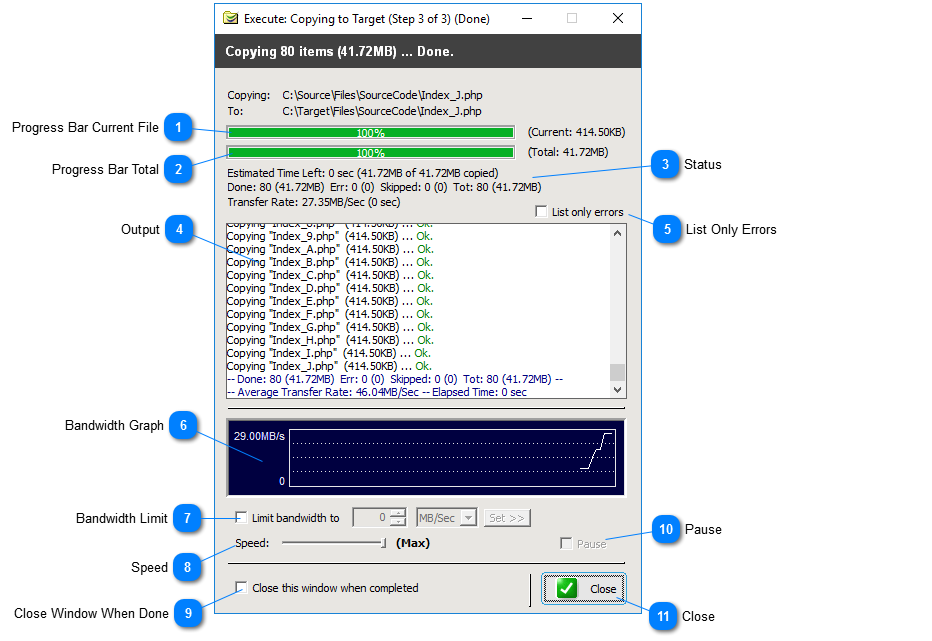
The copy/delete window shows progress while copying or deleting files.
 Progress Bar Current FileProgress bar for current file.
|
|
 Progress Bar TotalProgress bar for total operation.
|
|
 StatusShows Estimated Time Left, Done, Errors, Skipped, Total and Transfer Rate.
|
|
 OutputOutput window. Note: to only list errors in the output window, enable the option 'List only errors'. See below.
|
|
 List Only ErrorsCheck this option to list only errors in the output window
|
|
 Bandwidth GraphBandwidth graph
|
|
 Bandwidth LimitLimits bandwidth to a specified value. This value can also be set in the profile settings.
|
|
 SpeedSets overall copy/delete speed in percentage terms.
|
|
 Close Window When DoneSet to close this window automatically when copy/delete operation is completed.
|
|
 PausePause copy/delete operation.
|
|
 CloseCloses window and stops current operation if not finished.
|
|