

| Main Page > Browse Categories > How To / Articles > Synchronize Files Between Computers Not Connected |
Synchronize Files Between Computers Not Connected
For computers that are not connected to a network, file synchronization can be achieved using a portable USB drive.
The objective is to synchronize files between a computer at home (Computer 1) and a computer at work (Computer 2), as shown in this illustration.
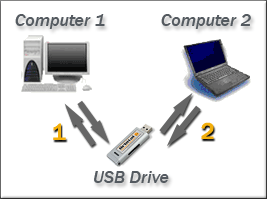
File synchronization is achieved in 2 steps:
- First synchronizing files on Computer 1 vs. a folder on the portable USB drive (1)
- Then using the USB drive at work and performing the same synchronization between the files Computer 2 and the same folder on the portable USB drive (2)
At the end of the process the same up-to-date files will be on both computers and on the USB drive, useful for backup purposes.
Steps 1 and 2 are repeated each time a synchronization is needed between the two computers.
Attachments
No attachments
Did this help you?
Yes No
Statistics
72% found this information useful
Other Options
Printable Version
General Information
No. 83
Author: TGRMN Software
Download ViceVersa File Synchronization Software Free Trial
Visit ViceVersa Forum
No attachments
Did this help you?
Yes No
Statistics
72% found this information useful
Other Options
Printable Version
General Information
No. 83
Author: TGRMN Software
Download ViceVersa File Synchronization Software Free Trial
Visit ViceVersa Forum
A printable version of the entire ViceVersa FAQ and Knowledge Base is also available.
For further queries, please contact us by E-Mail at support@tgrmn.com.
User Comments